IGET ONE 12000 Screen Symbols Explained: A Complete Display Guide
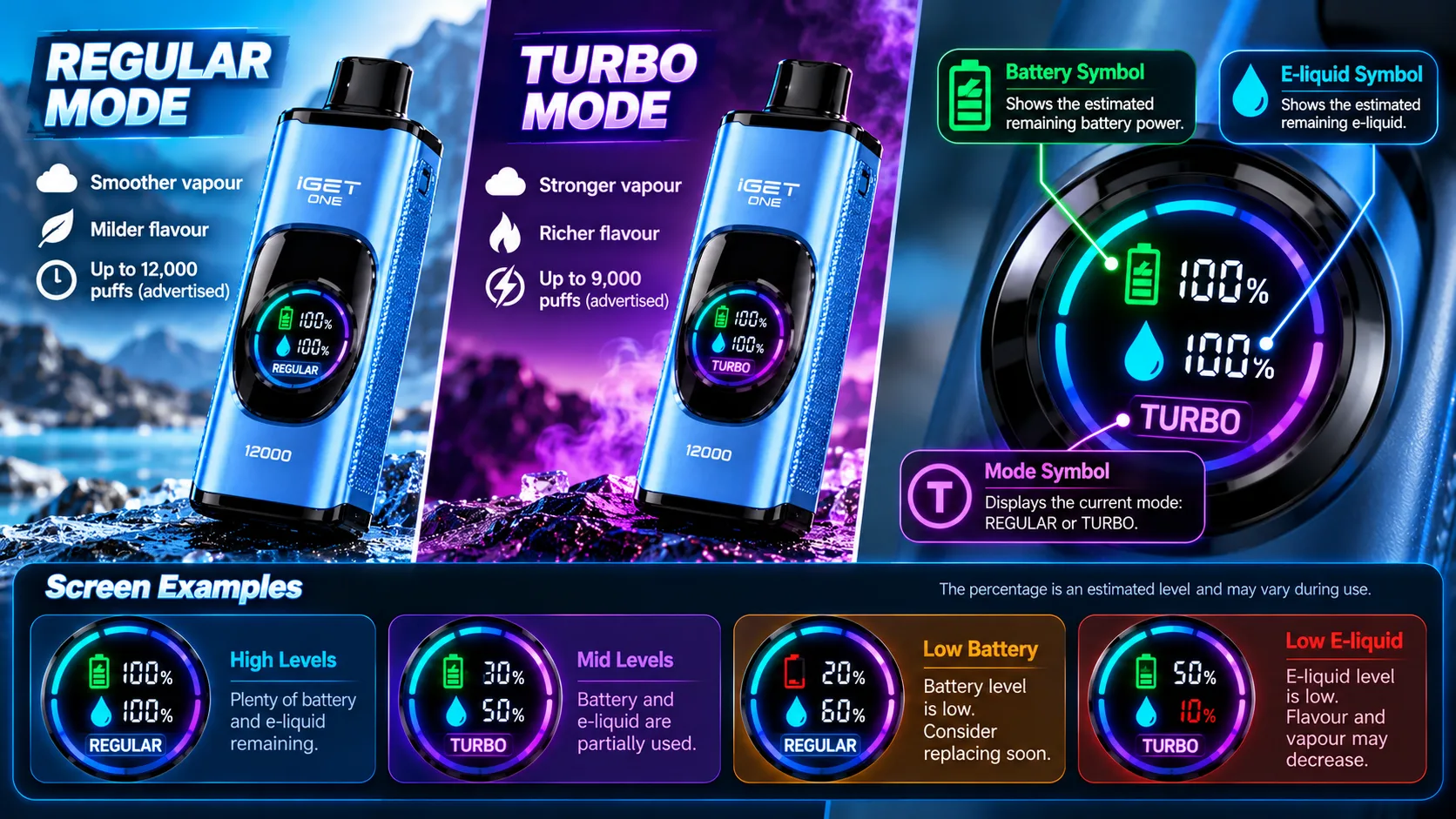
The IGET ONE 12000 features a large curved colour screen designed to display important device information.
Unlike devices with only a basic LED light, the IGET ONE screen provides information about battery status, remaining e-liquid and the selected operating mode.
But what do the different symbols actually mean?
This guide explains the main IGET ONE 12000 display icons, how to interpret the numbers and what to check when the screen behaves unexpectedly.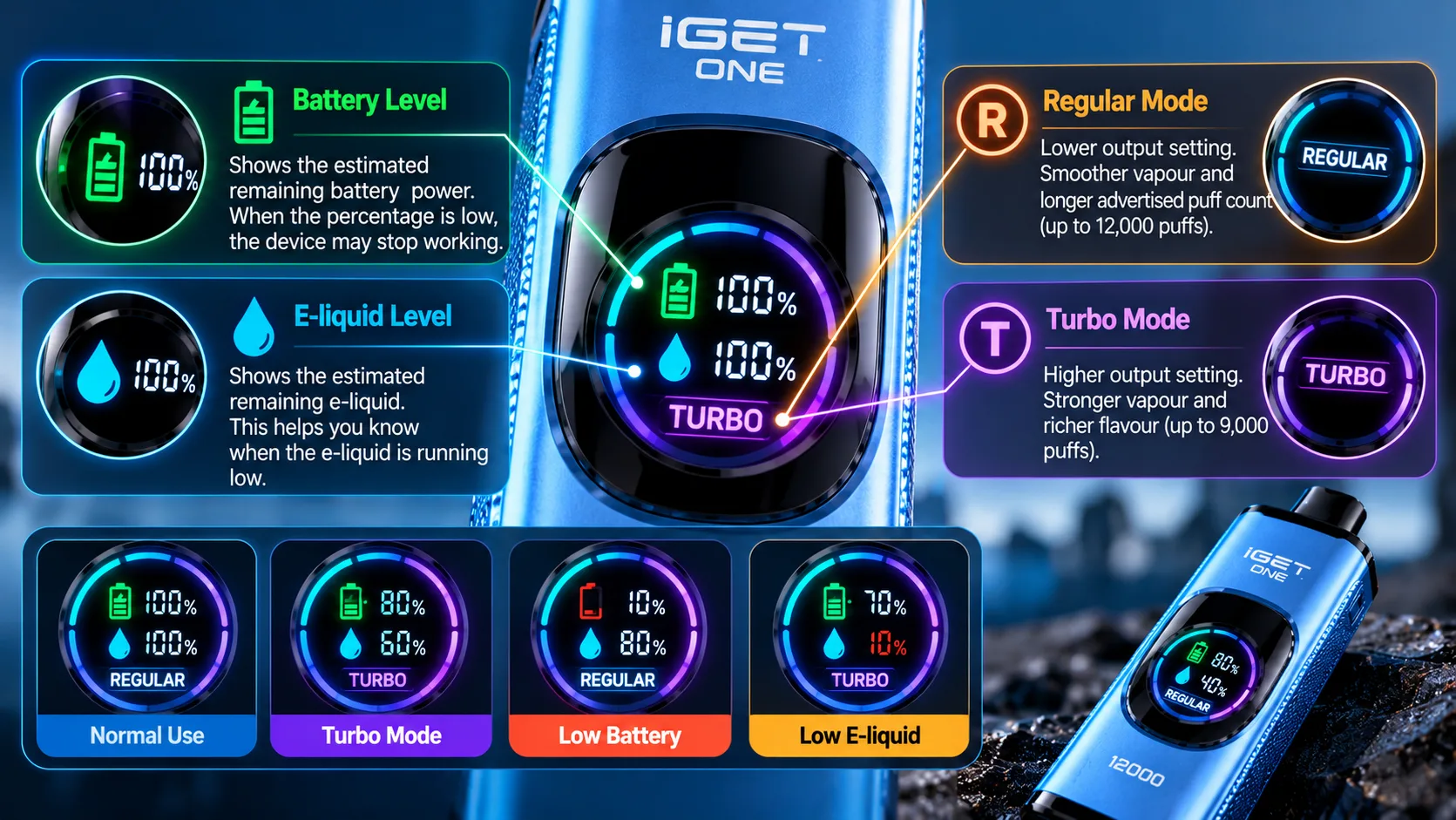
1. What Does the IGET ONE 12000 Screen Show?
According to IGET's product information, the smart display monitors three main functions:
Battery level
Remaining e-liquid
Regular or Turbo operating mode
The display uses illuminated graphics and numerical readings to present this information.
IGET ONE 12000 Screen Symbols at a Glance
Screen SymbolMeaningExplanationBattery / lightning iconBattery levelIndicates estimated remaining battery powerWater droplet iconE-liquid levelIndicates estimated remaining e-liquidPercentage (%)Remaining levelShows a numerical estimate associated with the displayed iconREGULARRegular ModeIndicates the lower-output operating modeTURBOTurbo ModeIndicates the higher-output operating modeAnimated light effectsDisplay animationVisual effects associated with screen operationThe exact appearance of the graphics may vary between device versions.
2. Battery Symbol: What Does It Mean?
The battery indicator represents the estimated remaining charge in the built-in battery.
For example:
100% suggests a full or nearly full battery.
50% suggests approximately half of the estimated charge remains.
10% indicates a low battery estimate.
These numbers should not be interpreted as laboratory-accurate measurements.
Battery indicators estimate charge based on the device's internal electronics.
If the display reports a low battery level and the device stops operating, the battery may be depleted.
3. E-Liquid Droplet Symbol Explained
The droplet icon represents the device's estimated remaining e-liquid.
It is separate from the battery indicator.
For example, the screen might show:
Battery: 80%
E-Liquid: 40%
This would indicate that the device estimates more battery capacity remaining than e-liquid.
The e-liquid percentage is an approximation, not a precise measurement of liquid volume.
A device may also stop producing aerosol for reasons unrelated to the displayed e-liquid level.
4. What Does REGULAR Mean on the Screen?
The REGULAR label indicates that the device is operating in Regular Mode.
IGET advertises this setting with:
Up to 12,000 puffs
Lower heating output
Moderate aerosol production
A milder throat sensation
The advertised puff count is a maximum estimate rather than a guaranteed number of inhalations.
5. What Does TURBO Mean on the Screen?
The TURBO label indicates that the higher-output operating mode is active.
According to IGET, Turbo Mode produces more aerosol and has an advertised rating of up to 9,000 puffs.
Higher output generally consumes more e-liquid and electrical energy per activation.
The TURBO symbol identifies the selected mode; it is not necessarily an error or warning message.
6. Why Are There Two Percentage Readings?
Some IGET ONE display layouts show separate numerical readings for battery and e-liquid.
These readings represent different resources.
For example:
BatteryE-LiquidInterpretation90%90%Both estimated levels are high70%30%More battery remains than e-liquid20%70%Battery estimate is relatively low10%10%Both estimated levels are lowThese examples illustrate how to read the screen. They are not predictions of actual remaining operating time.
7. Common IGET ONE 12000 Screen Problems
Screen Does Not Turn On
Possible explanations include a depleted battery, electronic failure or internal damage.
Do not open the device or attempt an improvised electrical repair.
Screen Shows a Percentage but No Aerosol Is Produced
The display may still function even if another component has failed.
Possible causes include a sensor fault, a damaged heating element or depleted e-liquid.
Stop using the device if it overheats, leaks or behaves abnormally.
Screen Shows Unexpected Numbers
Percentage estimates can change as the device operates.
However, repeated unexplained errors may indicate an electronic or sensor problem.
Screen Is Flickering or Displaying Incorrectly
A damaged display or internal circuit may cause flickering, incomplete symbols or unreadable numbers.
Do not continue using a device that shows signs of electrical damage.